WhatsApp:+86 18005022363 WeChat: +86 18005022363
  Email:
Product Overview
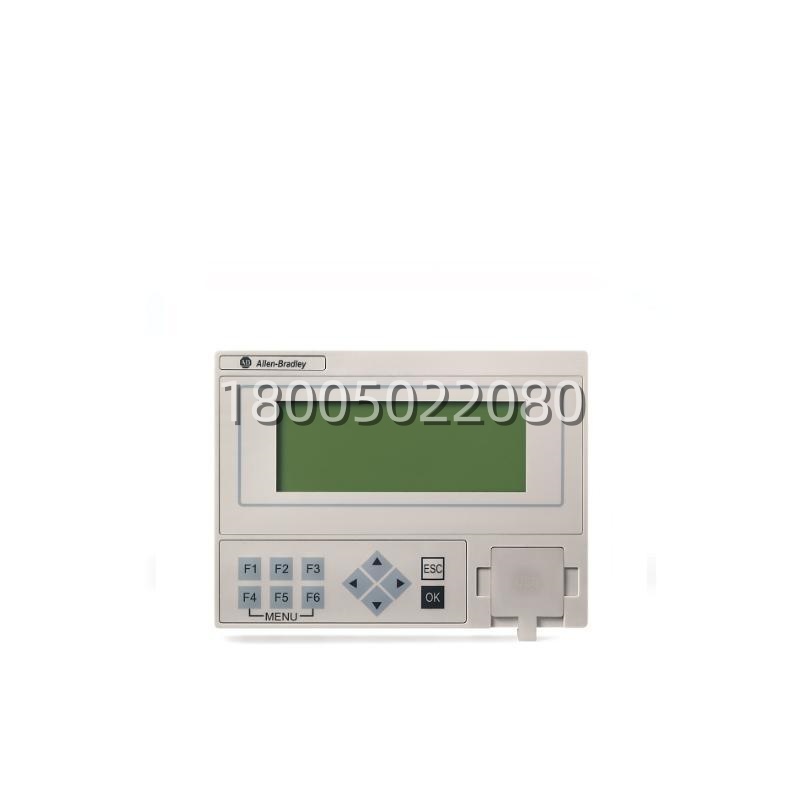
The Allen-Bradley 2080-LCD is a plug-in Liquid Crystal Display (LCD) and keypad module designed exclusively for use with Rockwell Automation’s Micro800 series programmable controllers—specifically the Micro810 (2080-810MINI-…), Micro820 (2080-820…), and, when used with the appropriate base/expansion configuration, certain Micro830/Micro850 systems equipped with the 2080-UMICRO8BASE option. The 2080-LCD clips directly onto the dedicated expansion header of a supported Micro800 CPU, requiring no external power supply, communication cable, or separate HMI software; it is recognized automatically by the controller firmware and configured through the Connected Components Workbench (CCW) programming environment. The module features a two-line by sixteen-character (2 × 16) alphanumeric dot-matrix LCD with LED backlight and a six-button keypad (Up, Down, Left, Right, Enter/Select, Escape/Back) that allows machine operators and commissioning technicians to view real-time controller tag values, navigate user-defined menu screens, acknowledge alarms, and modify setpoint variables—all without a connected PC or external HMI panel.The 2080-LCD transforms the inherently “headless” Micro810/Micro820 into a minimally viable operator interface, making it exceptionally useful for small standalone machines, OEM equipment packages, pump skids, and building-automation local panels where a full-color HMI would be cost-prohibitive or physically impractical. Through CCW’s LCD Screen Editor, engineers define up to 32 display screens with customizable text labels, static prompts, and dynamic tag references (integer, REAL, DINT, timer accumulator, counter preset/count, etc.). The 2080-LCD supports scrolling through these screens using the arrow keys and entering edit mode to change writable tag values within password-protected or unprotected ranges. Because the 2080-LCD draws power from the Micro800 CPU’s expansion bus and occupies no I/O points or communication port, it preserves all the controller’s native I/O and serial/Ethernet resources for field devices. With its snap-on installation, sunlight-readable backlit display, and NEMA/UL panel compatibility when the CPU is properly enclosed, the 2080-LCD is a frequently specified accessory for Micro800-based OEM machines requiring local indication and basic parameter adjustment capability.
Technical Specifications
| Product Model | 2080-LCD |
|---|---|
| Manufacturer | Allen-Bradley / Rockwell Automation |
| Product Type | Micro800 Series Plug-In LCD Display & Keypad Module |
| Compatible Controllers | Micro810 (2080-810MINI-xxx), Micro820 (2080-820xxx), certain Micro830/850 when used with 2080-UMICRO8BASE expansion carrier (check firmware revision) |
| Display Type | 2-line × 16-character alphanumeric LCD, STN reflective with LED backlight |
| Backlight | White or Yellow-Green LED (model-dependent), ON/OFF controllable via system bit in CCW |
| Keys | 6-button keypad: ▲ (Up), ▼ (Down), ◄ (Left), ► (Right), ✓ (Enter/Select), ✗ (Escape/Back) |
| Configurable Screens (max) | 32 user-defined screens via Connected Components Workbench LCD Screen Editor |
| Supported Tag Types for Display | INT, DINT, REAL, TIMER (PRE/ACC), COUNTER (PRE/CV), BOOL (as text-mapped), STRING (limited) |
| Power Source | Derived from Micro800 CPU expansion header (typically 5 V DC from CPU) |
| Current Draw (typ.) | ~40–60 mA from CPU expansion bus (included in CPU’s total expansion current budget) |
| Operating Temperature | 0 °C to +55 °C (32 °F to 131 °F) |
| Mounting | Plugs directly onto Micro800 CPU expansion connector; secured by molded latch; requires no panel cutout of its own (mounts with CPU) |
| Dimensions (module only) | Approx. 52 mm × 38 mm × 15 mm (H × W × D) – sits atop CPU |
| Certifications | CE, cULus, RoHS compliant |
| Required Software | Rockwell Automation Connected Components Workbench (CCW) v8.x or later for screen configuration |
Main Features and Advantages
The Allen-Bradley 2080-LCD adds local human-machine interaction to the Micro800 platform in a uniquely compact and cost-efficient way, offering several capabilities that set it apart from generic serial-text displays.Direct plug-on installation with zero wiring: The 2080-LCD requires no separate 24 V DC supply, no RS-232/RS-485 cable, and no communication port configuration—it mates with the Micro800 CPU’s expansion header in seconds. This eliminates the panel space, wiring labor, and commissioning time associated with even the smallest standalone HMI panels. For OEMs shipping large volumes of small machines, this “snap-on HMI” can represent a substantial bill-of-materials and assembly-time saving while still providing the essential operator functions of setpoint entry and status display.Fully configurable via Connected Components Workbench: Screen layout is designed in CCW’s LCD Screen Editor—a WYSIWYG tool where you place static text (e.g., “Speed Setpoint:”, “Fault Code:”) and bind dynamic fields to any controller tag visible to the Micro800 program. Up to 32 screens can be defined and linked hierarchically (e.g., Main → Parameters → Alarm Log → Back). The 2080-LCD navigates these screens via the arrow keys; the Enter key opens editable fields (subject to optional 4-digit PIN protection configured in CCW), and the Escape key backs out. This means machine builders can create branded, application-specific menus without writing any HMI script or purchasing HMI development software.Real-time tag monitoring and on-the-fly setpoint changes: Unlike a PC-connected programming cable (which may not be available on the plant floor), the 2080-LCD gives maintenance staff immediate visibility into key process variables—motor speed, timer presets, counter accumulators, fault codes—and permits authorized changes within limits defined by the programmer. This is invaluable during start-up, troubleshooting, and recipe adjustment on standalone equipment such as small conveyors, fillers, labelers, and custom test fixtures.Backlit display and intuitive keypad: The LED-backlit 2×16 LCD remains readable in typical indoor industrial lighting; the backlight can be toggled via a system bit in the ladder program (e.g., turn on when a fault is active, dim after 30 s of inactivity). The six-button keypad follows a familiar menu-navigation metaphor (Up/Down to scroll list or increment/decrement numeric values, Left/Right to change screens, Enter to confirm, Escape to cancel), minimizing operator training.Preserves all controller resources: Since the 2080-LCD communicates over the internal CPU bus and consumes only a few milliamps from the expansion current budget (well within the Micro810/Micro820 expansion allowance), it does not occupy serial ports, Ethernet/IP connections, or I/O image words. The Micro800’s built-in RS-232/RS-485 port and embedded Ethernet (on Micro820) remain fully available for Modbus RTU master/slave, ASCII messaging, or EtherNet/IP adapter/slave duties—unlike serial-text displays that would consume one of those scarce ports.OEM branding and documentation-friendly: CCW allows static text on each LCD screen to be written in any Latin-alphabet language (English, Spanish, French, German etc. character set), enabling OEMs to ship equipment with localized operator prompts. The small physical footprint of the 2080-LCD (mounted on the CPU which itself is DIN-rail or panel-mounted inside the enclosure) means the “operator interface” travels with the controller, reducing the chance of panel-mounted HMI hardware being damaged or stolen in public/remote installations.