WhatsApp:+86 18150087953 WeChat: +86 18150087953
  Email:

Description
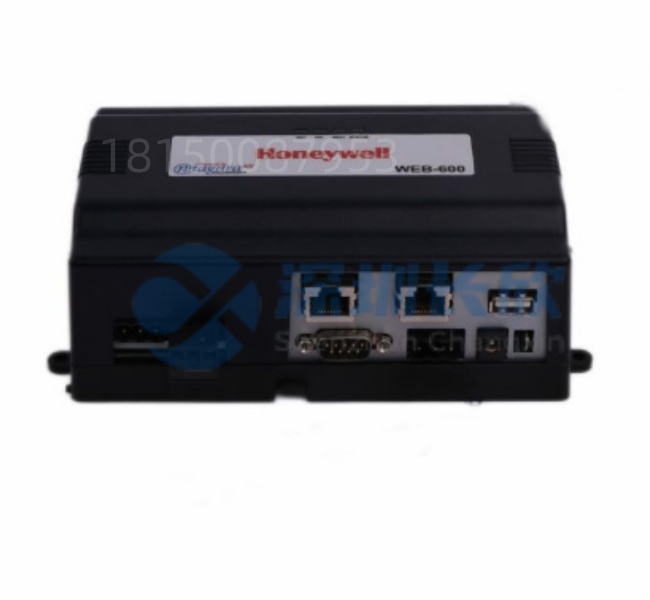
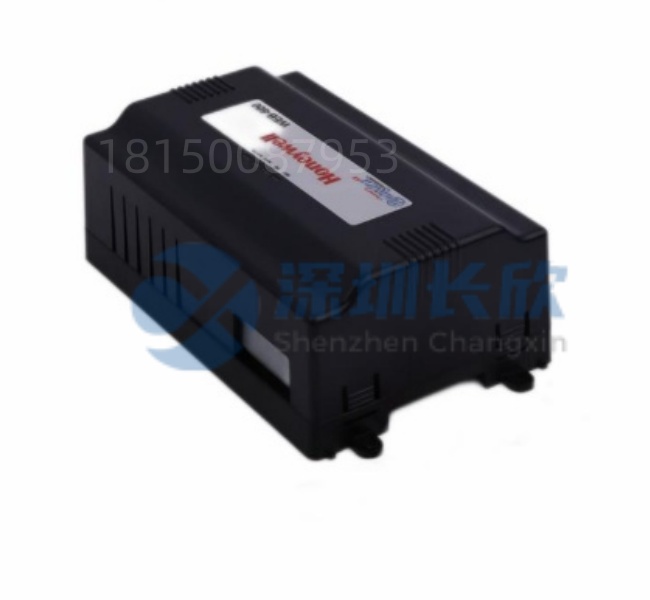
The Honeywell WEB-600 is a dedicated industrial web server module that enables secure, browser-based remote access to process data, alarms, trends, and graphics from Honeywell’s TDC 3000. TotalPlant Solution (TPS), and Experion® PKS control systems. By converting native DCS displays into standard HTML5-compatible web pages, the Honeywell WEB-600 allows authorized users to monitor operations from any device with a web browser—without requiring proprietary client software.
Designed for reliability and cybersecurity, the Honeywell WEB-600 bridges the gap between legacy control infrastructure and modern digital operations—empowering engineers, operators, and management to stay connected, even off-site.
Application Scenarios
At a remote natural gas processing facility in Alberta, winter storms frequently isolate the site for days. Before deploying the Honeywell WEB-600. plant managers had no visibility during outages. After installation, senior engineers could securely log in via tablet from home to review compressor vibration trends, acknowledge non-critical alarms, and verify safety system status—all through a standard Chrome browser. During a -40°C freeze event, this remote access prevented an unnecessary emergency dispatch, saving over $28.000 in helicopter costs. The site now calls the Honeywell WEB-600 their “digital lifeline.”
Parameter
表格
Technical Principles and Innovative Values
Innovation Point 1: Zero-Client Remote Access
Unlike traditional HMIs requiring thick clients or RDP, the Honeywell WEB-600 renders DCS screens directly in any modern browser—eliminating software deployment, patching, and compatibility issues.
Innovation Point 2: Legacy System Modernization Without Replacement
Plants running 20+ year-old TPS systems can instantly gain mobile and remote capabilities without migrating controllers—extending asset life while meeting digital transformation goals.
Innovation Point 3: Defense-in-Depth Cybersecurity
The Honeywell WEB-600 supports VLAN segmentation, firewall rules, and multi-factor authentication (when integrated with enterprise identity providers), aligning with ISA/IEC 62443 best practices.
Innovation Point 4: Lightweight & Deterministic Architecture
With no Windows OS or general-purpose OS, the Honeywell WEB-600 runs on a hardened real-time kernel—immune to ransomware, blue screens, and unplanned reboots.
Application Cases and Industry Value
A municipal water authority in the U.S. Midwest used the Honeywell WEB-600 to provide after-hours access to pump station status for on-call technicians. Previously, staff had to drive 30 miles to check a tripped breaker. Now, they confirm the issue remotely and bring the right tools—or reset the system via linked controls if authorized. Response time dropped from 90 minutes to under 10. improving service reliability and reducing overtime costs by 35%.
In another case, a global EPC firm standardized the Honeywell WEB-600 across 12 brownfield refinery upgrades, enabling central engineering teams in Houston, Singapore, and Rotterdam to jointly troubleshoot startup issues in real time—cutting commissioning delays by three weeks per site.
Related Product Combination Solutions
GUS (Global User Station) – TPS operator console that feeds data to WEB-600
Experion Server / Workstation – Source of graphics and tags for Experion-based WEB-600 deployments
FTE Network – High-availability backbone for connecting WEB-600 to controllers
Honeywell Cyber Security Appliance – Adds next-gen firewall and IDS/IPS for WEB-600 traffic
OPC Router / Kepware – Bridges WEB-600 to third-party historians or cloud platforms
Mobile Device Management (MDM) – Enforces secure access policies for tablets/phones using WEB-600
TPS I/O & Controllers (e.g., HPM, LCN) – Underlying control layer visualized by WEB-600
Installation, Maintenance, and Full-Cycle Support
Install the Honeywell WEB-600 on a DIN rail in a control cabinet or mount it near an operator station. Connect it to the plant LAN via Ethernet and to a 24VDC power source. Configure IP settings, user roles, and DCS data sources using the built-in web setup interface. For TPS systems, ensure the GUS or EOP is running and accessible on the network.
Maintenance is minimal—no OS updates or antivirus scans required. Monitor the status LED: green = operational, red = fault. Firmware updates are delivered securely via encrypted packages. Always place the WEB-600 behind a plant firewall and restrict external access to VPN-only tunnels.
We fully test every Honeywell WEB-600 for connectivity, graphic rendering, and security compliance before shipment. Each unit includes a 12-month warranty and access to our automation cybersecurity specialists for secure deployment guidance.