WhatsApp:+86 18005022363 WeChat: +86 18005022363
  Email:
Description
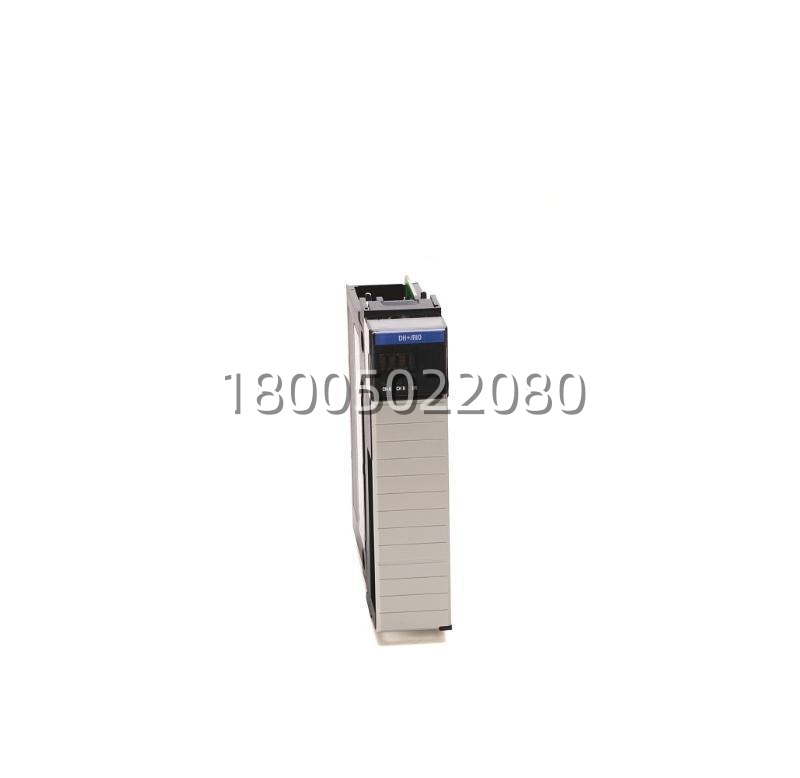
Technical Specifications
| Product Model | 1756-DHRIO (1756-DHRIO/E, 1756-DHRIO/C) |
|---|---|
| Manufacturer | Rockwell Automation / Allen-Bradley |
| Product Type | ControlLogix Dual-Port DH+ / Remote I/O (RIO) Communication Interface Module |
| Number of Ports | 2 (Channel A & Channel B, independently configurable) |
| Port A / Port B Interfaces | DH+ (RS-485 half-duplex, Belden 9463 / 9842 shielded twisted pair) and/or Remote I/O (Universal RIO Scanner or Adapter mode) |
| DH+ Baud Rates Supported | 57.6 kbps, 115.2 kbps, 230.4 kbps (auto-negotiate on some FW) |
| Remote I/O Baud Rate | 57.6 kbps / 115.2 kbps / 230.4 kbps (Scanner: up to 230.4 kbps; Adapter: matches scanner) |
| RIO Rack Capacity | Up to 32 Remote I/O racks (as Scanner); up to 1 rack emulation (as Adapter) |
| DH+ Node Address Range | 0–77 (octal) per DH+ specification |
| Backplane Current Draw | 750 mA typ. @ 5 V DC; 3 mA @ 24 V DC |
| Isolation (Field to Backplane) | 500 V DC continuous |
| Connector Type | RJ45 (pinned for DH+ / RIO: Pin 1 = Shield Drain, Pin 2 = Signal Common (Blue/White), Pin 3 = Signal A (Blue), Pin 4 = NC, Pin 5 = NC, Pin 6 = Signal B (Orange), Pin 7 = Signal Common Return, Pin 8 = Shield) |
| Indicators | Module Status (MS) – Green/Red; Port A: ACT, ERR, TX/RX; Port B: ACT, ERR, TX/RX |
| Chassis Slot Requirement | 1 slot in any 1756 ControlLogix chassis (1756-A4, -A7, -A10, -A13, -A17) |
| Operating Temperature | 0 °C to +60 °C (32 °F to 140 °F) |
| Storage Temperature | -40 °C to +85 °C |
| Relative Humidity | 5–95% non-condensing |
| Dimensions (H×W×D) | 140 × 31 × 152 mm (5.51 × 1.22 × 5.98 in) approx. |
| Weight | Approx. 0.27 kg (0.6 lb) |
| Agency Approvals | cULus Listed (UL 508, UL 1604 Class I Div. 2 Groups A/B/C/D optional on /E), CE, C-Tick, FM, KC |
Main Features and Advantages
Dual independent configurable ports for flexible legacy integration: Each channel on the Allen-Bradley 1756-DHRIO can be independently set as DH+ node or Remote I/O scanner/adapter, allowing one module to bridge a DH+ network on Channel A while scanning legacy 1771 or 1746 Remote I/O racks on Channel B—eliminating the need for separate interface cards and conserving ControlLogix chassis slots.Transparent DH+ messaging via MSG instructions: The Allen-Bradley 1756-DHRIO enables a ControlLogix controller to execute PCCC-style read/write messages (typed as DH+ or CIP-to-DH+ encapsulated) to legacy PLC-5 or SLC 5/04 nodes on the DH+ network. This allows data exchange—such as setpoints, batch parameters, or status flags—between old and new platforms during migration phases without changing legacy program logic.Full Remote I/O scanner and adapter emulation: As a RIO scanner, the Allen-Bradley 1756-DHRIO can poll up to 32 remote racks (1771, 1746, 1794 FLEX I/O with RIO adapter) with configurable block sizes (discrete + analog words per rack). In adapter mode, it can emulate a 1771 rack for connection to a legacy PLC-5 RIO scanner, useful for inserting a Logix controller into an existing RIO topology transparently.Seamless migration path preserving field wiring: By using the Allen-Bradley 1756-DHRIO to scan existing 1771-A series RIO adapters and 1746 I/O racks, end users can upgrade the processor from PLC-5/SLC to ControlLogix while leaving field wiring, terminal blocks, and I/O hardware intact—dramatically reducing downtime and rewiring cost in plant-floor modernization projects.Robust diagnostics and LED status feedback: The Allen-Bradley 1756-DHRIO provides detailed port-level diagnostics accessible via Logix tags (error counters, last error codes, RIO rack status bits) and front-panel LEDs showing link activity, errors, and module health. This accelerates troubleshooting of DH+ cabling faults (termination resistors, missing node, baud mismatch) and RIO scanner issues (racked I/O offline, CRC errors).Slot-efficient, backplane-powered design: Consuming only one ControlLogix chassis slot and drawing power from the 1756 backplane, the Allen-Bradley 1756-DHRIO requires no external power supply for logic operation (though the DH+/RIO network itself requires proper termination—typically 150 Ω at each end of a DH+ trunk line). Configuration is stored in the controller project and downloaded with the I/O image, supporting warm-swap (RIUP) when used with a compatible chassis and firmware.
Application Field
The Allen-Bradley 1756-DHRIO is most commonly deployed in legacy system modernization and multi-generational control architecture projects. In a typical oil & gas, metals, or automotive plant upgrading from PLC-5 to ControlLogix, the Allen-Bradley 1756-DHRIO is installed in the new ControlLogix chassis and connected via Channel B to the existing 1771-A2B / 1771-ASB Remote I/O adapter daisy chain. The ControlLogix processor then scans those legacy racks exactly as the old PLC-5 did, allowing the control program to be migrated gradually—rung by run—while the field I/O remains untouched. Meanwhile Channel A can be connected to the plant-wide DH+ network to exchange data with remaining SLC 5/04 or PLC-5 nodes that have not yet been upgraded, providing a phased obsolescence strategy rather than a disruptive “big bang” replacement.Food & beverage, pharmaceutical, and batch processing facilities use the Allen-Bradley 1756-DHRIO to maintain communication with legacy packaging line controllers (often SLC 500 on DH+) for supervisory data collection—OEE metrics, recipe downloads, alarm summaries—without disturbing validated legacy code. The module’s ability to originate DH+ messages via MSG instructions from the ControlLogix allows the new system to read/write N-file integers or status bits in the old controllers for display on a FactoryTalk® View HMI or for archiving in a batch record database.In large material handling and baggage handling systems originally built around PLC-5 RIO scanner networks, the Allen-Bradley 1756-DHRIO replaces the obsolete PLC-5 processor while continuing to supervise dozens of remote I/O drops spread across conveyors and sortation zones. Its support for up to 32 RIO racks and selectable baud rates (including 230.4 kbps for high-speed RIO) ensures compatibility with both older and newer RIO adapter hardware. For sites with both DH+ and RIO legacy assets, a single Allen-Bradley 1756-DHRIO often suffices to interface both networks, consolidating gateway functions and simplifying spare-parts inventory.
Related Products
1756-DHRIO2 — Newer dual-port DH+/RIO module with enhanced firmware features and sometimes improved DH+ performance; direct functional replacement for the 1756-DHRIO in most applications—verify firmware compatibility with your Logix OS version.1756-ENBT / 1756-EN2T / 1756-EN3T — EtherNet/IP communication modules for ControlLogix; used alongside or eventually to replace the 1756-DHRIO as legacy DH+/RIO devices are migrated to EtherNet/IP (POINT I/O 1734-AENTR, 1794-AENTR, etc.).1785-L80E / 1785-L55 — PLC-5 processors with built-in Ethernet or DH+/RIO ports; the 1756-DHRIO is often specified to replace the scanning function of a retired PLC-5 that formerly acted as the RIO scanner or DH+ node.1771-ASB / 1771-A2B — Legacy 1771-series Remote I/O adapter modules that are scanned by the 1756-DHRIO when configured as a RIO scanner; these adapters connect 1771 I/O modules to the ControlLogix via the DH-485/RIO physical layer.1747-SN — SLC 500 RIO Scanner module; in some hybrid systems the 1756-DHRIO (as RIO Adapter) talks to an SLC 500 acting as RIO Scanner, though more commonly the 1756-DHRIO is the scanner talking to 1746 RIO adapters (1746-CRIO, 1747-SN in adapter mode is rare).1756-A7 / 1756-A10 — ControlLogix chassis (7-slot, 10-slot) into which the 1756-DHRIO is installed; requires adequate 5 V DC backplane current from the power supply (e.g., 1756-PA72 or 1756-PB72).
Installation and Maintenance
Pre-installation preparation: Before installing the Allen-Bradley 1756-DHRIO, verify that your ControlLogix chassis power supply (1756-PA72, 1756-PB72, etc.) has sufficient 5 V DC backplane current margin—the Allen-Bradley 1756-DHRIO draws approximately 750 mA @ 5 V DC. Power down the chassis, insert the module into an available slot, and seat it firmly until the ejector lever clicks. In Studio 5000 Logix Designer, add the Allen-Bradley 1756-DHRIO to the I/O Configuration tree under the appropriate chassis slot; set the Major/Minor revision to match the module’s firmware. Configure Channel A and Channel B for the intended protocol (DH+ Node or Remote I/O Scanner/Adapter), assign DH+ node address(es) if applicable (0–77 octal, unique on the DH+ segment), and define RIO rack addresses, sizes (discrete words, analog words), and scan lists if operating as RIO Scanner. Use a correctly pinned RJ45-to-DH+/RIO cable (Belden 9463 or equivalent shielded twisted pair, 150 Ω termination resistors at both ends of the DH+ trunk). After wiring, apply power and confirm the Module Status LED is solid green; check port LEDs—ACT should illuminate when communicating on DH+, and RIO ERR should be off when all defined racks are online.Maintenance recommendations: The Allen-Bradley 1756-DHRIO is a solid-state module with no user-serviceable parts. Routine checks should include verifying that the MS LED remains green during operation and that RIO rack status bits in the controller tag file reflect expected online status. If a RIO rack drops offline, inspect the physical cabling, confirm termination resistors are present at both ends of the RIO daisy chain, and verify the rack’s adapter address DIP switches match the scanner definition in the Allen-Bradley 1756-DHRIO configuration. For DH+ issues (node won’t communicate), confirm unique node addresses, correct baud rate matching across all nodes on the segment, and proper shield grounding at one end only. The module supports Remove and Insert Under Power (RIUP) in a powered ControlLogix chassis—if replacement is necessary, the controller will re-establish communications after reinsertion provided electronic keying matches. Periodically inspect the RJ45 connectors for corrosion or loose strain relief, and never open the module housing. Firmware updates should be performed per Rockwell Automation’s ControlFLASH procedures and only when compatibility with the existing Logix OS and application has been confirmed.
.jpg)